Build
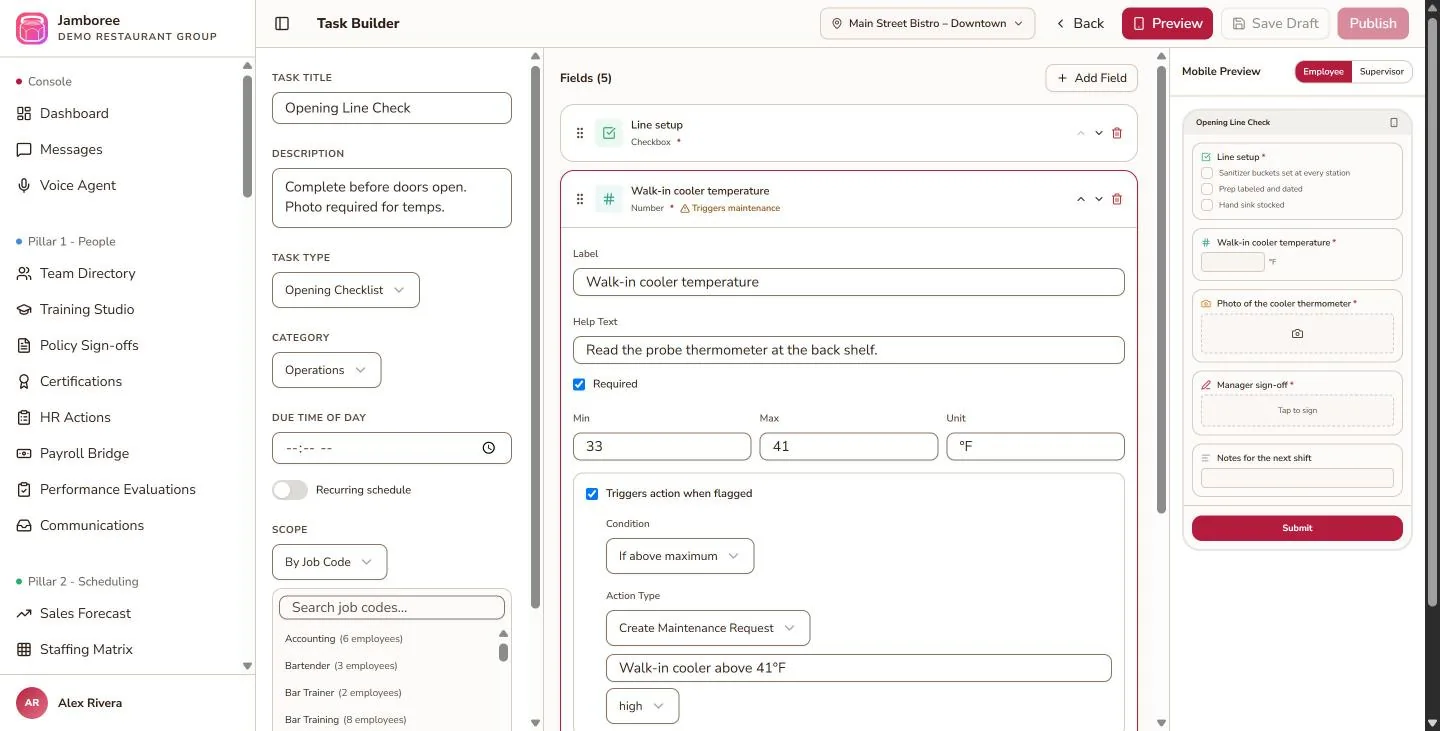
Design a task in the task builder from field types and components, and decide which items should be flagged when they fail or fall out of range.
Turn opening, closing, and shift routines into digital checklists — with temperature logs, photos, and signatures — and let flagged items route their own follow-ups.
Design a task in the task builder from field types and components, and decide which items should be flagged when they fail or fall out of range.
Send it to people or job codes with timing and a repeat schedule, choose reviewers, and notify by app push and/or SMS — or with a QR code that opens the task in the app.
Supervisors approve submissions with an AI-generated summary. Flagged items automatically create maintenance requests and supply orders.
Pick field types, set ranges, and decide what a flagged answer should trigger. The mobile preview on the right shows what your team will see.
Match the way each routine actually runs.
Capture exactly what you need to see.
Problems don’t wait for someone to read the clipboard.
Food-safety data in the same system.
Good to know: tasks currently in active use by the scheduler can’t be edited.
Step-by-step instructions are in the User Guide.