Employee completing digital training on a phone
People, HR & Compliance

Digital Training & Education

Build gamified courses in the console, deploy them by person, role, or location, and see exactly who has learned what — while your team trains on their phones in English or Spanish.

How it works

From the console to the floor.

Build

Create a course manually, or use the AI course generator to produce complete, role- and brand-specific course content — not just an outline.

Deploy

Assign courses to people, roles, or locations. Lessons unlock in order and finish with an assessment that issues a completion certificate.

Track

See per-employee, per-lesson progress and quiz scores in the console. Managers can follow progress from the app too.

In the console

The course editor.

Lessons on the left, content blocks on the right: reading cards, quizzes, and acknowledgments, with Spanish versions and AI generation built in.
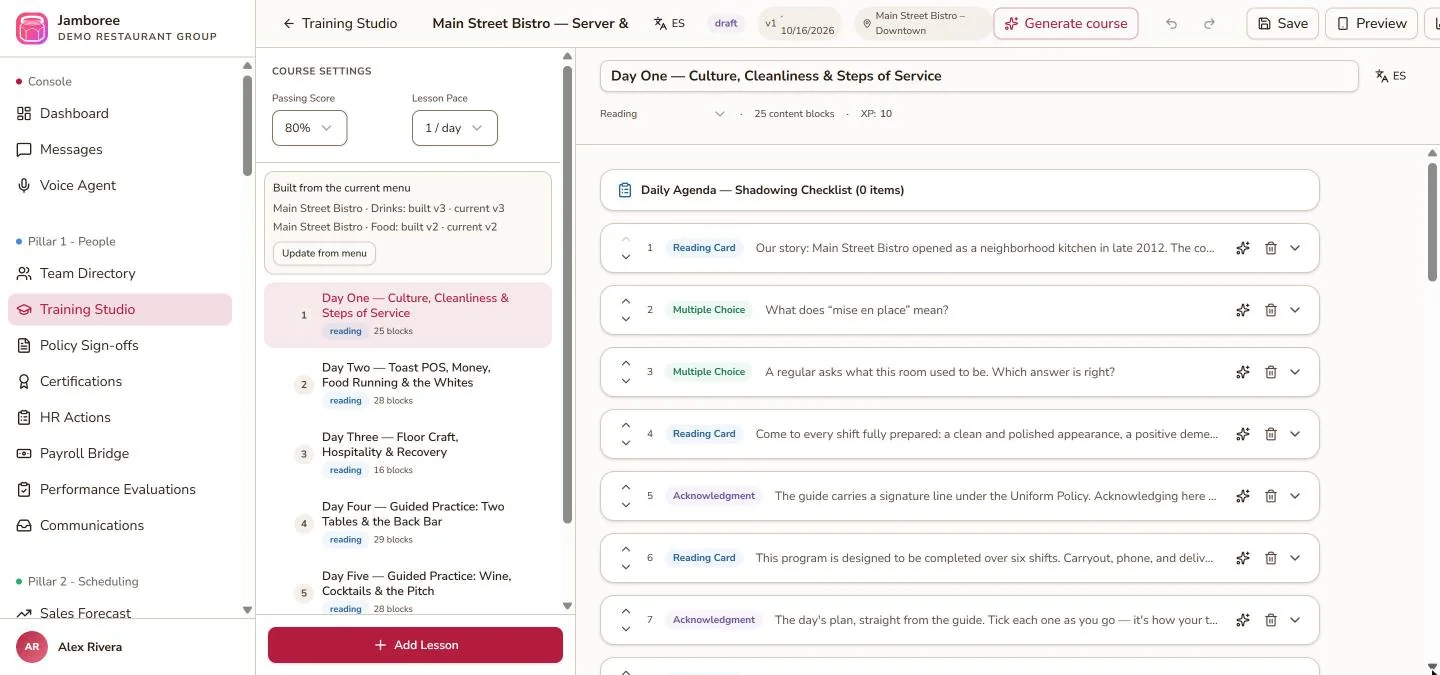
Jamboree Training Studio course editor showing a six-day server training course with reading cards, multiple-choice questions, and acknowledgments
A server training course in Training Studio. Sample data shown.
What you can configure

Set up by your own administrators.

Training Studio courses

Mix formats so training sticks.

  • Reading cards, video lessons, and daily practical tasks
  • Quizzes with six question types: multiple choice, true/false, scenario, drag-and-drop ordering, fill-in-the-blank, and matching
  • Sequential lesson unlock and a final assessment with a completion certificate

Policy sign-offs

Assign policies and keep a defensible signature record.

  • Create or upload a policy and assign it to people, roles, or locations
  • Optionally require a short quiz after the reading
  • Employees scroll to the end before signing; Jamboree records the signature, device, IP, timestamp, and policy version

Certifications

Manage the certification lifecycle across locations.

  • Configure requirements by role and location
  • Issue or upload certificates, verify them, and get automated renewal alerts before they expire
  • Print inspector-ready PDF certificate binders and see who’s current on a cross-location dashboard

English and Spanish

Each person chooses their language.

  • Users set their language in their profile settings
  • Navigation and content follow that choice in the console and the app
On mobile

What your team sees.

  • Work through lessons, earn XP, and keep streaks
  • Unlock lessons in order, pass the final assessment, and receive a certificate
  • Sign assigned policies — signed policies appear under My Records
  • View their own certificates under My Certifications
Before you start

What you’ll need.

  • Your team invited to Jamboree — or synced from Toast if your account includes the Toast integration
  • Roles and locations set up, so courses reach the right people
  • Your existing material (documents and videos), or a brief for the AI course generator

Step-by-step instructions are in the User Guide.